How can customer dates become useful follow-ups?
Should you choose Contact Date Trigger or Form Date Trigger?
How do you set the date, time and timezone?
Which customer workflows can you build?
How does a date trigger send the right message?
How should you test and measure the workflow?
How can your team get started?
A booking is confirmed, a membership is nearing expiry, or a service has just been completed. The date is already in your records. Yet someone still has to check a list, work out who needs a message and remember to send it. When several people share that responsibility, a straightforward follow-up can become another task to chase.
imBee Date Trigger connects that stored date to a workflow. Choose a contact date field or a form date field, decide whether the workflow should start before, on or after the date, and set a fire time and timezone. Connect the actions you want the workflow to take. Your team keeps control of the recipient, sending channel and message.
The practical benefit is a repeatable process: the rule checks for due records instead of requiring someone to reconstruct the audience every day. It is useful for teams managing appointments, renewals and after-service communication, provided those dates are captured consistently. It does not create a booking system or connect an external calendar by itself.
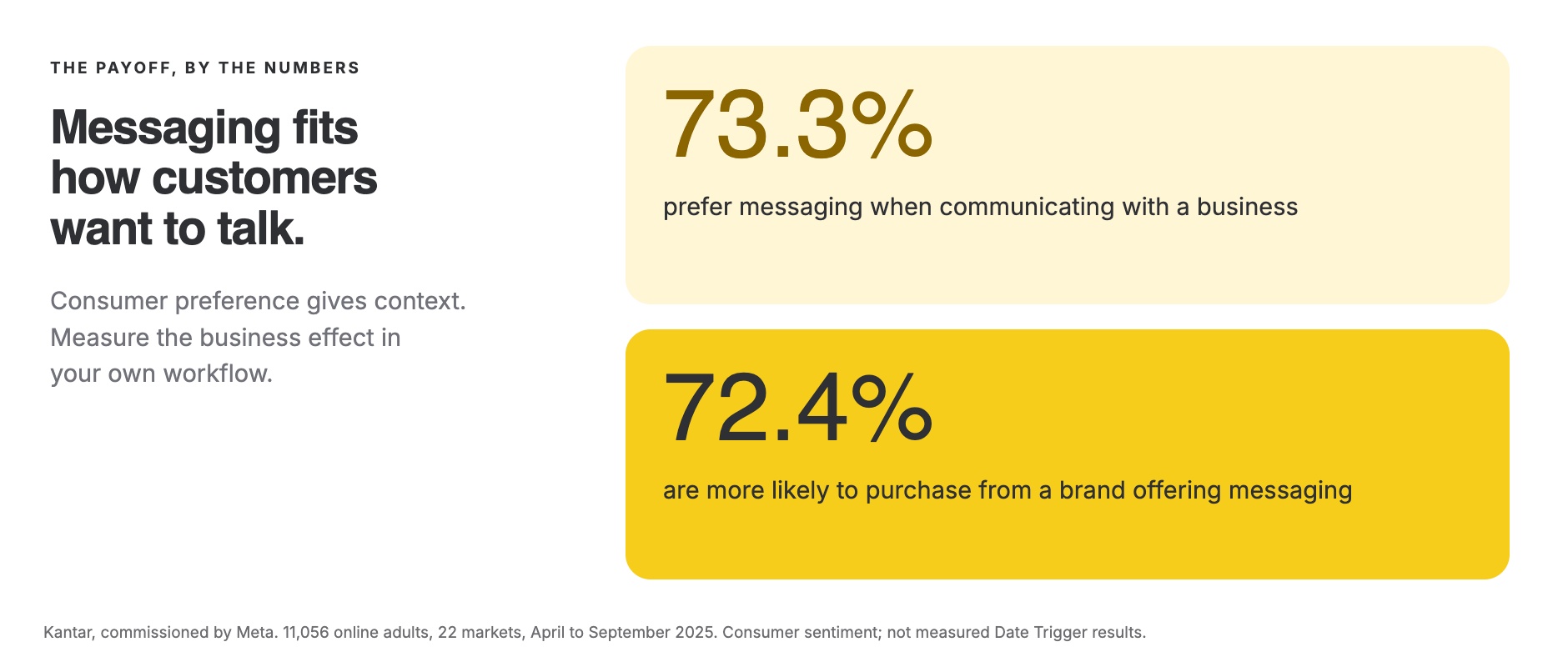
The payoff, by the numbers: Kantar research commissioned by Meta points to a preference for messaging businesses and an association between messaging availability and purchase intent. The chart gives the study’s figures and scope. These are consumer preferences, not measured results from Date Trigger. They explain why a useful, well-timed message is worth planning.
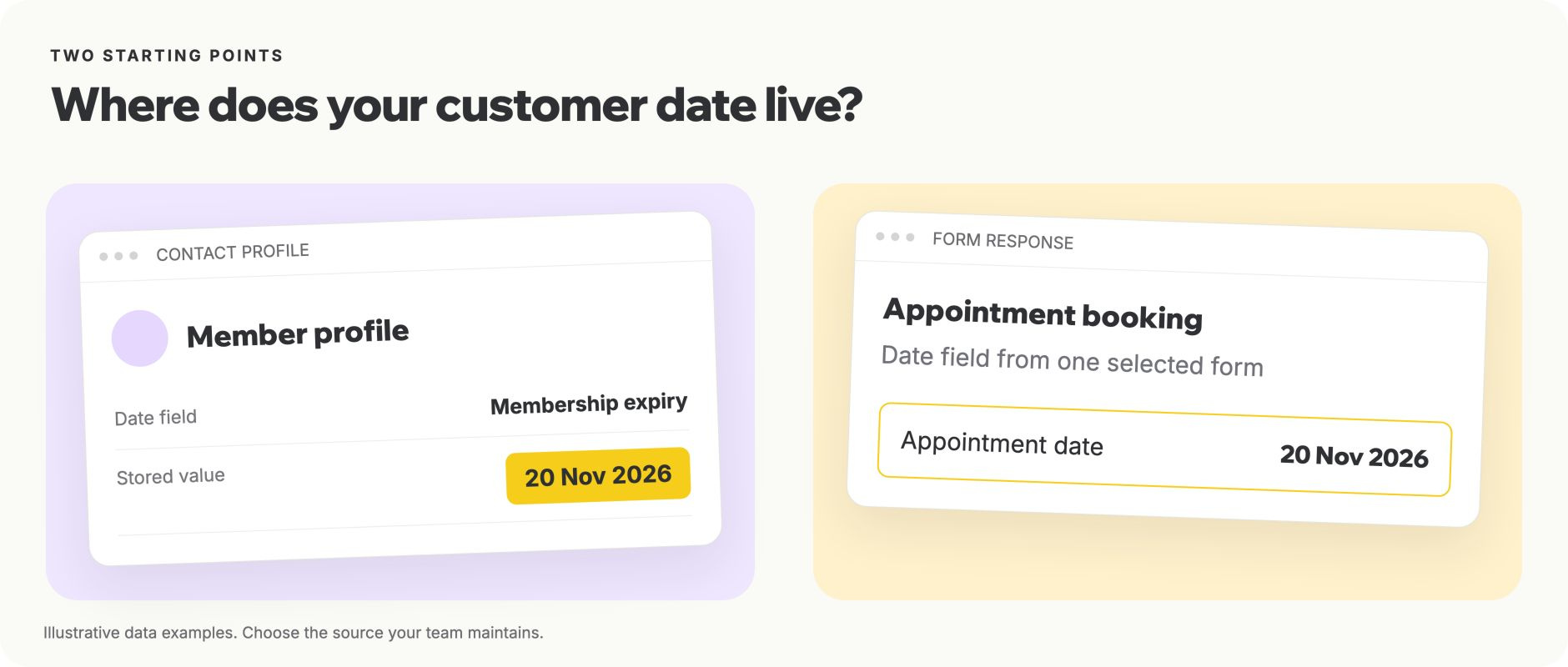
Contact Date Trigger reads a date field on the contact profile. This fits a date that belongs to the ongoing relationship, such as membership expiry, a contract end date or a planned collection date. You select the relevant field and define the timing rule. The workflow identifies contacts whose stored dates meet that rule.
Form Date Trigger reads a date field from responses to a selected imBee form. First select the form, then its date field. An appointment booking form could supply an appointment date; a service form could supply the date of a completed visit. One Form Date Trigger is configured against one selected form. Additional forms need their own configuration.
| Question | Contact Date Trigger | Form Date Trigger |
|---|---|---|
| Where is the date? | Contact profile date field | Date field in selected form responses |
| Typical use | Membership renewal reminder | Reminder before a booked appointment |
| What do you configure? | Contact date field and timing rule | Form, date field and timing rule |
Choose the source that your team actually maintains. If staff update an appointment form but your workflow reads an unrelated contact field, the rule will follow the wrong record. Agree which field is authoritative before building the workflow. Use a real date field with a complete calendar date rather than a free-text note such as “next Friday”.
Date Trigger is also different from sending a broadcast to a hand-built segment on a fixed date. A broadcast starts with a campaign audience and send schedule. A date trigger evaluates the stored customer date against a reusable rule. Both can be useful; choose according to what changes from customer to customer.
Each rule has three timing decisions: before, on or after the stored date; a number of whole days where applicable; and a fire time in a selected timezone. For example, a form holding an appointment date of 20 November could start a reminder workflow one day before, at 09:00 in Asia/Hong_Kong. That is a reminder on 19 November at the configured time.
Be precise about the difference between a calendar-day rule and an appointment-time calculation. “One day before at 09:00” does not mean exactly 24 hours before an appointment at 15:30. The current release does not provide minutes or hours relative to a combined appointment DateTime field. That distinction matters when setting expectations for customers and staff.
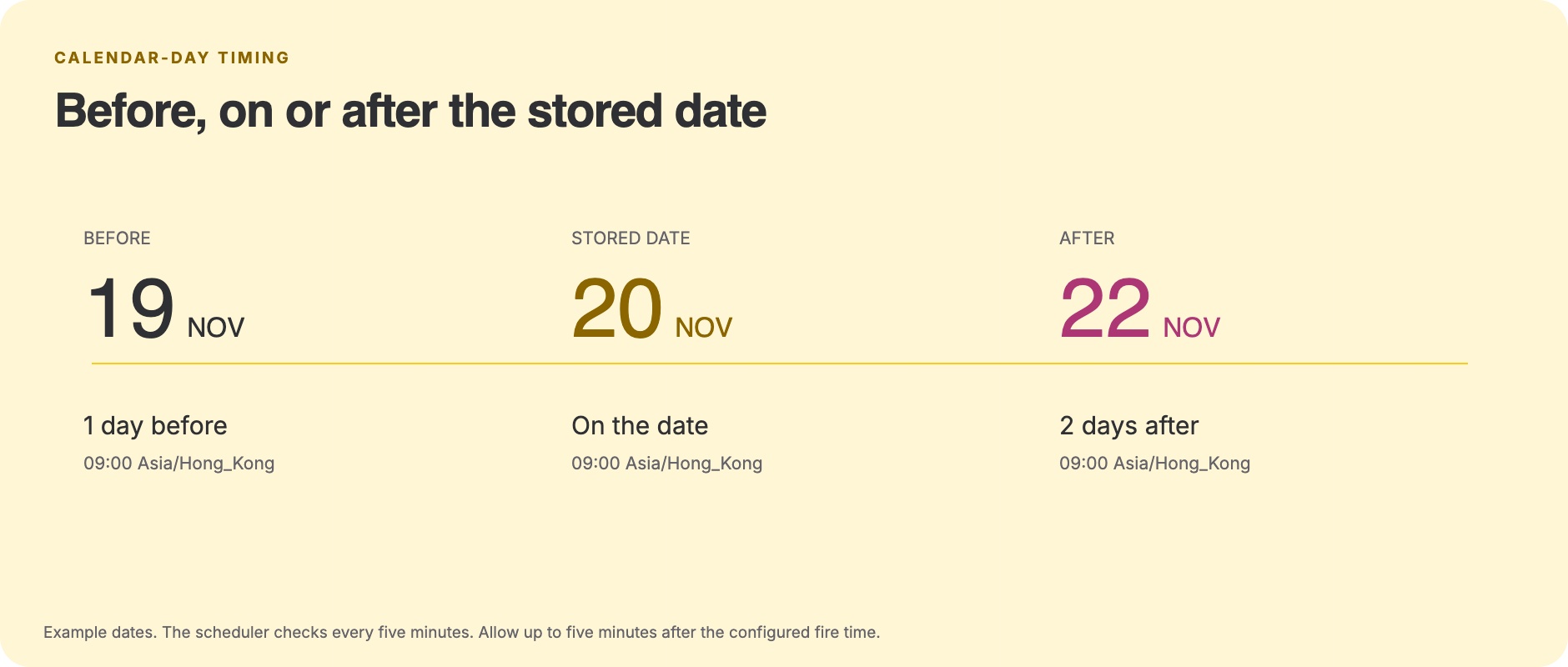
The scheduler checks every five minutes. The interface notes that delivery may occur up to five minutes after the configured time. Treat the fire time as a scheduled processing point, rather than a promise that a message will arrive at an exact second. Downstream messaging-platform acceptance and delivery are separate steps.
For an initial test, put the fire time comfortably ahead of the current time and use a date that will match the rule on that day. Confirm the timezone before activating. If your workflow appears inactive, check the stored date, the rule direction, the offset and the fire time together. A correctly configured rule with no matching records has nobody to process.
Appointment reminders. A clinic, service centre or consultation team can use an appointment date captured in an imBee form to start a reminder workflow one calendar day before the visit. The message can restate practical arrangements and offer a way to contact the team. This replaces checking tomorrow’s appointment list and preparing each reminder manually. Keep the message limited to appropriate booking information; a date trigger is not a medical decision tool.
Membership renewals. A retail membership or service team can use a contact-level expiry date to start a renewal conversation seven days before expiry. That timing gives the customer an opportunity to ask questions before the date passes. The workflow replaces a recurring export of expiring memberships, provided the contact field is kept current. Whether the message is utility or marketing depends on its content and the applicable messaging-platform rules.


Post-service follow-ups. A business that records a service date in a form can start a follow-up two days afterwards. The message could ask whether the customer needs further assistance or provide an appropriate next step. This replaces maintaining a separate callback spreadsheet. The workflow follows the recorded date; it does not infer that a service has actually been completed.

Birthday and semester-break offers. Give customers a reason to shop before an upcoming occasion. For example, send a birthday coupon seven days before the customer’s upcoming birthday, or a relevant offer fourteen days before the end-of-semester break. Store the full upcoming date in the contact profile or the selected form, set the whole-day offset, and connect the approved marketing message. This gives customers time to plan and use the coupon, with the aim of encouraging purchases. Track coupon redemptions, resulting sales and unsubscribes to assess the effect. The workflow sends your offer message; coupon creation and redemption belong to your commerce or promotion system. Automatic annual birthday recurrence is not included, so maintain the next full date. Use appropriate marketing permission and an approved WhatsApp marketing template where required.


| 用例 | Illustrative rule | Measure during the pilot |
|---|---|---|
| Appointment reminder | 1 day before at 09:00 HKT | Attendance and time spent preparing reminders |
| Membership renewal | 7 days before at 09:00 HKT | Replies and renewals before expiry |
| Post-service follow-up | 2 days after at 10:00 HKT | Follow-ups completed and customer responses |
| Birthday / semester-break offer | 7 / 14 days before the full upcoming date | Coupon redemptions, resulting sales and unsubscribes |
These timings are example configurations, not recommended frequencies for every customer. Choose the interval around the customer’s needs and the permissions you hold. If you need several reminders around the same date, plan and test each rule explicitly instead of assuming the trigger includes a ready-made reminder sequence.
Annual birthday recurrence is not part of the scope evidenced for this release. Do not assume that a historical birth date will automatically repeat every year. Use the supported full-date behaviour and confirm any separate recurrence requirement with the imBee team.
The trigger starts the workflow with matching records and a normalised contact identifier. The Send Message action determines how a message is sent. For a contact-based reminder, select Specific Receiver, keep the receiver mapped to {{ $json.contact.identifier }}, and select the connected sending channel. Do not rely on Current Chat when the source is a contact record with no chat context.
One Send Message node uses one selected sending channel. Date Trigger does not automatically choose a different channel for each customer according to their most recent conversation. If your business uses several numbers, branches or brands, map that routing deliberately through separately configured actions or workflows and verify the intended sender during testing.
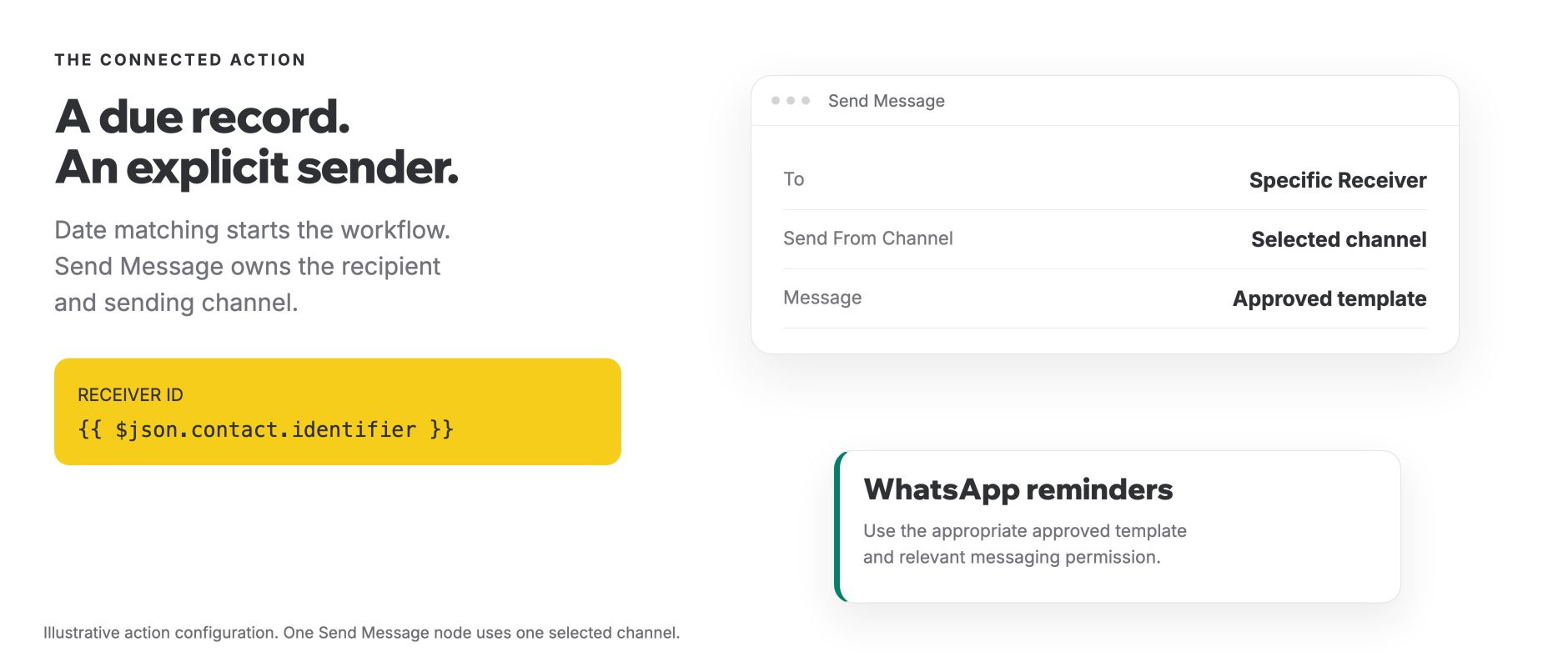
For WhatsApp reminders initiated by the business, use an approved message template suited to the purpose. WhatsApp permits free-form replies within the 24-hour customer service window after a user message; outside that window, approved templates are required. A stored appointment date or phone number does not itself establish permission to contact someone.
Template category is determined by content and context, not by whether a workflow runs automatically. Adding an offer to a renewal reminder can change its classification. Meta’s template guidance and messaging policy should inform the final wording. The date trigger does not bypass those requirements, channel availability or messaging limits.
Start with an approved, simple message. Check that the date in the text matches the date that caused the workflow to run, and avoid including unnecessary personal or health information. Customers should understand why they are receiving the message and what they can do next.
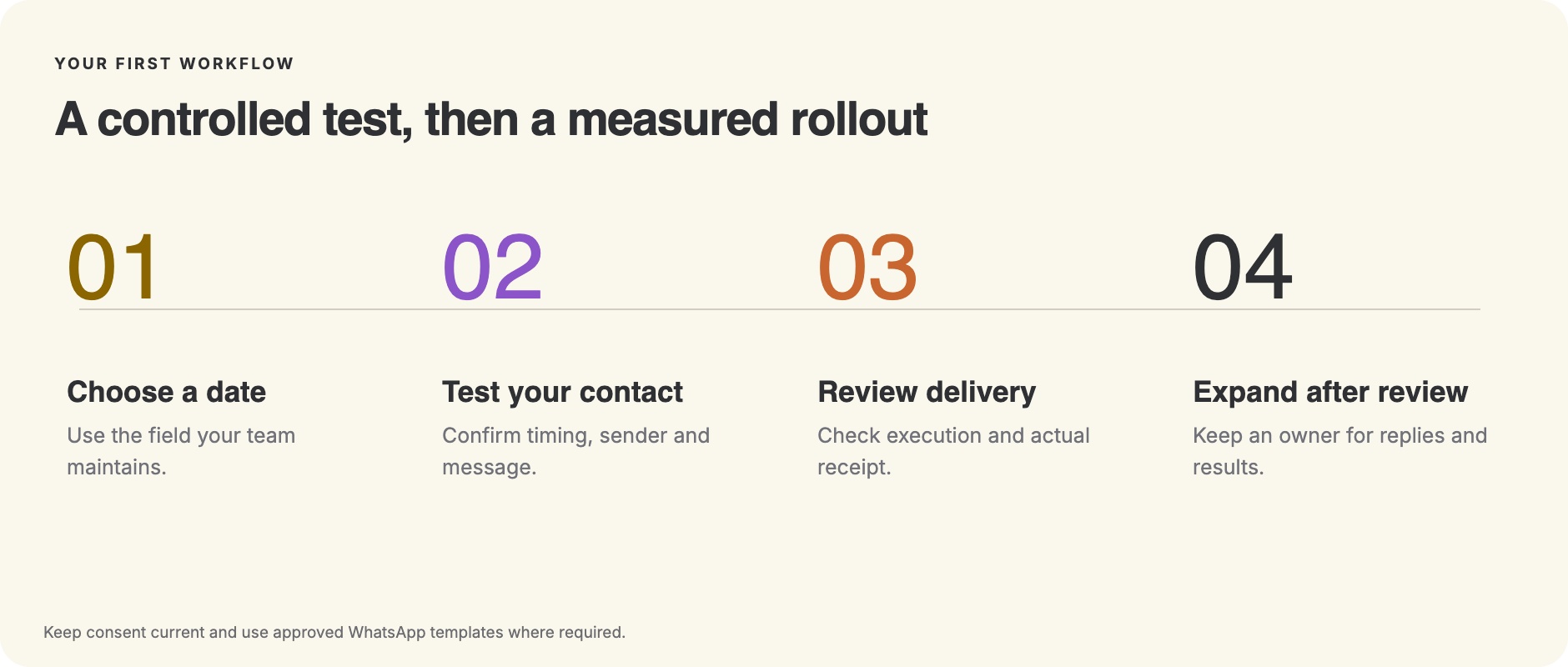
Test with a contact and recipient you control before expanding the audience. Confirm the selected form or contact date field contains the expected value, the workflow is active and the rule should match today. Check that the workflow runs after its configured fire time, allowing for the five-minute scheduling interval.
Then inspect the sending step and the actual message outcome. A workflow can start successfully while a connected channel rejects the send or a recipient cannot receive it. Review the execution, template variables and downstream message status, and confirm receipt on the test device. A completed workflow is not, by itself, evidence that a customer has read the message.
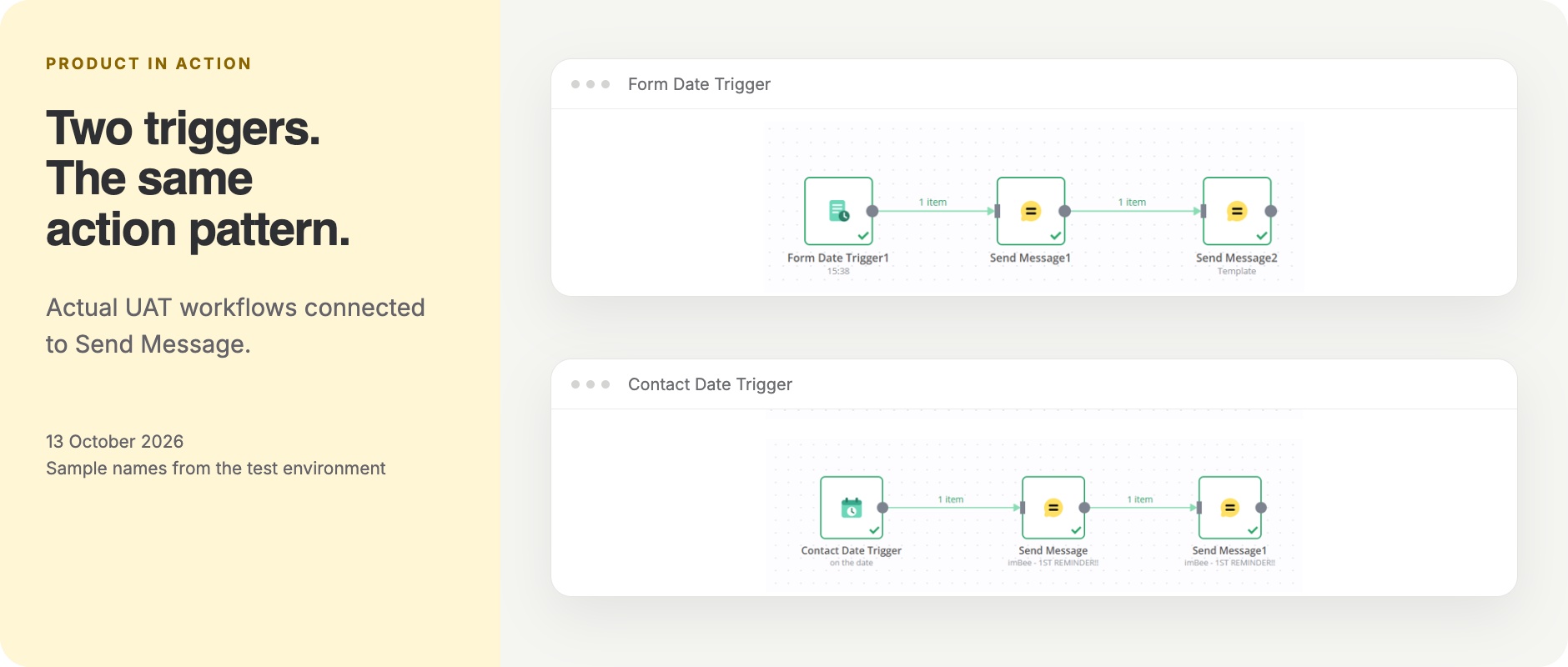
For the first live pilot, nominate an owner who can review unexpected matches and customer replies. Keep the audience small enough to examine the initial outcomes. Date-field cleanup can change which records qualify, so compare the expected audience with the observed result before assuming the rule is ready for a wider rollout.
Choose measurements that connect to the original problem. For appointment reminders, compare attendance and staff preparation time over comparable periods. For renewals, track replies and renewals before expiry. For post-service follow-up, track completed follow-ups and the quality of responses. Keep the denominator clear: eligible records, attempted messages, delivered messages and customer actions are different populations.
Establish your own baseline and record the test conditions before presenting savings or conversion changes. The feature’s immediate value is a repeatable date-based workflow; its business impact depends on the quality of the dates, the message, the audience and the process around it.
Pick a recurring task your team can describe in one sentence: remind customers before their appointment, start a renewal conversation before expiry, or follow up after a service. Identify the date field that makes the task possible and the person responsible for keeping that field correct.
Next, choose the trigger, timing rule and connected message action. Prepare the appropriate template, check permissions and test the workflow with your own contact. Review the message on the recipient’s device, not only the workflow canvas. Agree how your team will handle replies and who will review the first pilot.
We can walk through the configuration with you and help confirm which date source fits your process. Bring one example date and the message you would like the customer to receive. The first session can focus on that single workflow, with a clear path from configuration to a controlled test and then a reviewed rollout.
Book a demo with the imBee team to explore Date Trigger for Contact and Form. If you already use imBee, contact your customer success team to confirm access and the right setup for your workspace.
What is imBee Date Trigger?
imBee Date Trigger starts a workflow relative to a date stored in a contact field or an imBee form response. You choose before, on or after the date, a whole-day offset where relevant, a fire time and a timezone, then connect the workflow actions you need.
What is the difference between Contact Date Trigger and Form Date Trigger?
Contact Date Trigger uses a date field on the contact profile. Form Date Trigger uses a date field in responses to a selected imBee form. Both use the same calendar-day timing approach, but you configure the source differently. Choose the source your operational team actually maintains.
Can I send a reminder a few hours before an appointment?
This release uses whole-day offsets and a fixed fire time. Hours or minutes relative to a combined DateTime value are deferred. A rule set to one day before at 09:00 runs on the previous calendar date; it is not an exact appointment-time calculation.
Will a message arrive at the exact time I set?
The scheduler checks every five minutes, and the product notes that delivery may be up to five minutes after the configured fire time. Downstream channel processing and delivery also matter. Use the selected timezone, allow for the scheduling interval, and inspect actual message outcomes during your test.
Does Date Trigger choose the sending channel automatically?
The sending channel belongs to the Send Message action. A Contact Date Trigger does not automatically select each customer’s most recent conversation channel. Use Specific Receiver with the contact identifier and select the appropriate connected channel. Plan separate routing where your process needs several senders.
Do WhatsApp date reminders need an approved template?
Business-initiated WhatsApp reminders should use an approved template suited to their purpose. Outside the 24-hour customer service window, WhatsApp requires approved templates. You also need the relevant permission to contact the person. Date matching does not replace consent, template approval or messaging-platform requirements.
Does a birthday field repeat the workflow every year?
Birthday offers use the next full upcoming birthday date. Maintain that date in the selected contact or form field. This release does not automatically repeat a historical date of birth every year.
How do I confirm that the workflow has worked?
Use a test contact you control, set a matching date and a future fire time, then activate the workflow. Check the execution and sending step after the scheduled interval. Finally confirm receipt on the test device, because a triggered workflow and a delivered customer message are separate outcomes.
imBee Editorial Team
Content and product marketing, imBee
The imBee Editorial Team writes about WhatsApp Business, omnichannel messaging and the platform changes that affect how businesses in Hong Kong, Singapore, Malaysia and Indonesia talk to their customers. Every platform fact is checked against the primary source and dated.
Questions about anything in this article? Talk to our team.