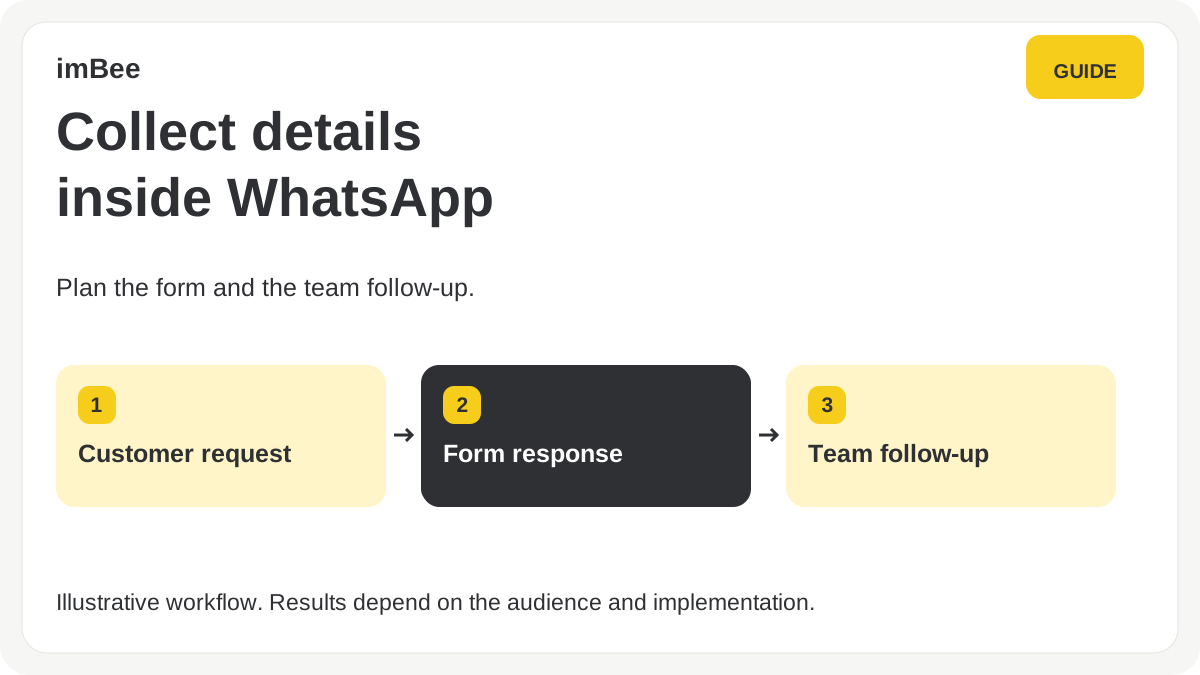
WhatsApp Form is imBee's no-code builder on Meta's WhatsApp Flows. Teams can prepare structured forms inside imBee and send them in a WhatsApp conversation. Check the configured fields, publishing permissions and supported workflow in a demonstration.
The form is built and published inside imBee. In a demonstration, check the available field types, publishing permissions and the route from a submitted answer to a team follow-up.
What to measure in your workflow
Measure the full journey: a delivered invitation, a completed form and a useful team follow-up. Test with your own audience rather than treating a channel benchmark as a promised result.
Where teams put it to work
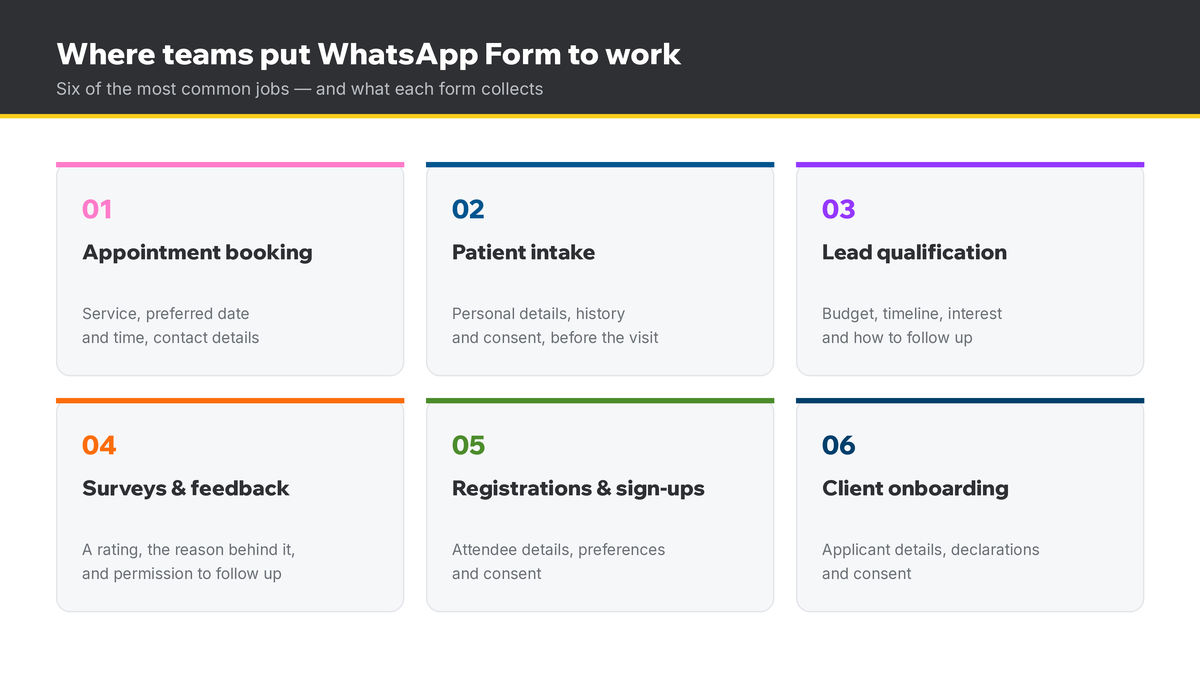
Choose a workflow that matches the information your team needs. The examples below are possible uses, subject to platform, privacy and organisational requirements.
| 用例 | What the form collects | What it replaces |
|---|---|---|
| Appointment bookingHealthcare, clinics, beauty, professional services | Service, preferred date and time, contact details | A phone call and a manual calendar entry |
| Patient intake & pre-registrationHospitals, clinics, dental | Personal details, history and consent, before the visit | A clipboard at reception and re-keyed paperwork |
| Lead qualificationProperty, finance, education, B2B | Budget, timeline, interest and how to follow up | A separate lead-qualification web form |
| Surveys & feedbackRetail, hospitality, service teams | A rating, the reason behind it, permission to follow up | A separate email survey |
| Registrations & sign-upsEvents, NGO, education, membership | Attendee details, preferences and consent | A separate registration microsite |
| Client onboardingBrokerage, insurance, lending | Applicant details, declarations and consent | A PDF emailed back and forth |
Healthcare gets its own section further down, and there is a wider set after it. But the pattern is the same every time: the question is asked where the customer already is, and the answer comes back structured.
Prepare a form in imBee under Customer Management > Forms, choose the available fields and logic, publish it, and test sending it from the inbox or a configured workflow. Review the returned records and export process.
重點摘要
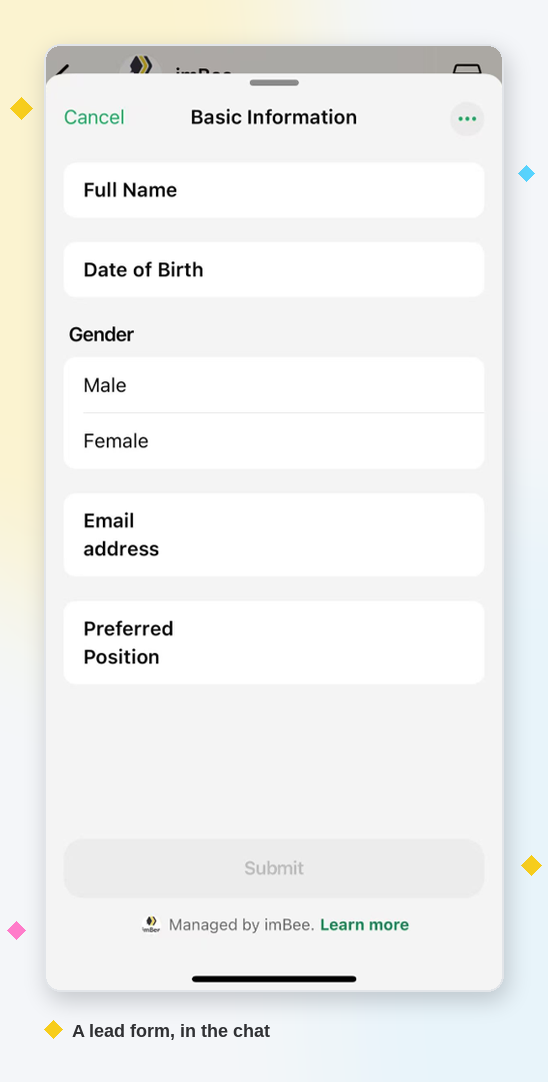
以下是此功能的概覽:
| 詳細資訊 | 須知事項 |
|---|---|
| Built on | Meta's official WhatsApp Flows |
| Where it runs | Inside the WhatsApp chat (no browser) |
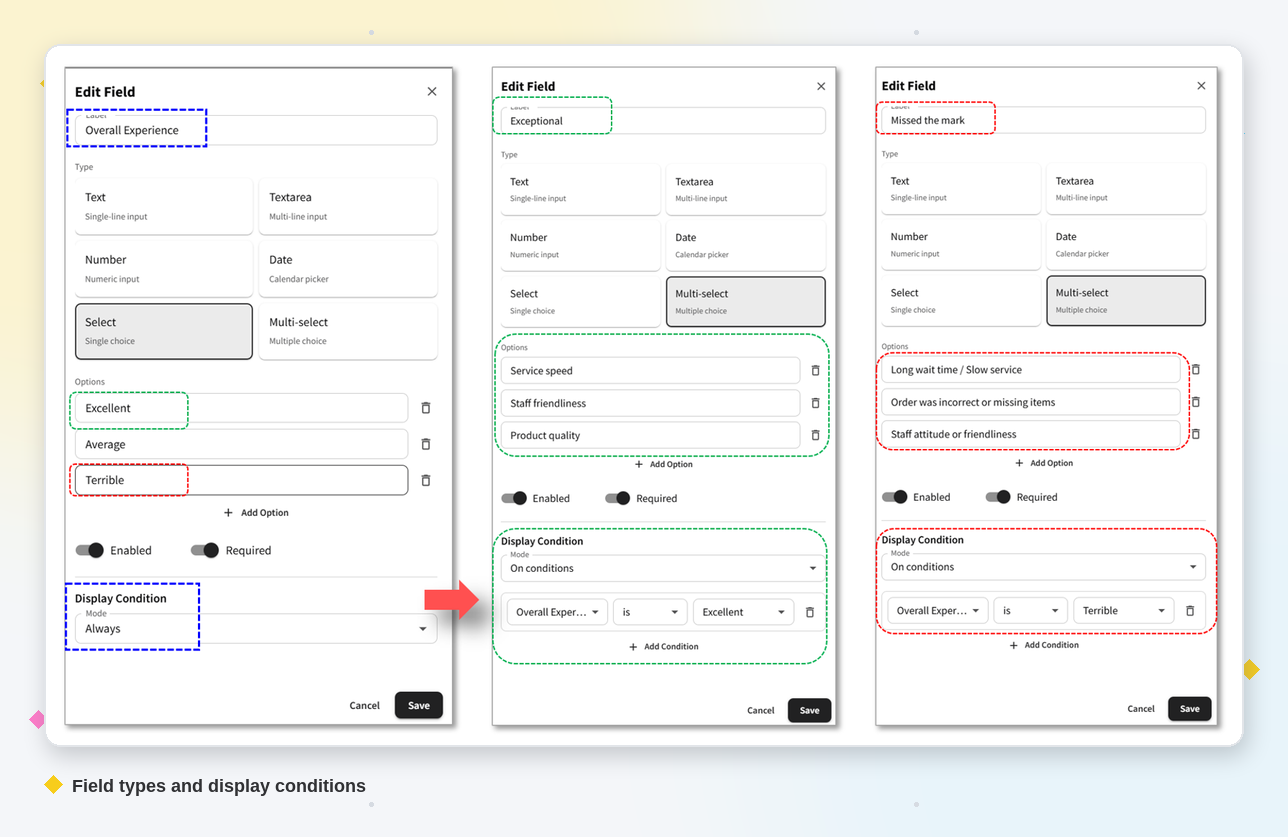
| Field types | Text, text area, number, date, select, multi-select |
| Logic | Conditional fields (shown on prior answers) |
| Sent from | imBee inbox or a workflow "Form Input" node |
| Data | Encrypted responses; exportable records |
| Security | Verify current certificate scope and configured controls |
| Seen by | Agents — a contact's submitted forms appear beside the conversation |
New to the platform? Start with our guide to the WhatsApp Cloud API.
Build it. In imBee, go to Customer Management > Forms > New Form. Add each field (label, type, and whether it is required), set its display condition, and Save. Publish the form to use it; any later edit needs a quick Republish before the change goes live. You build and publish the form entirely inside imBee — no switching to WhatsApp Manager, and no code.
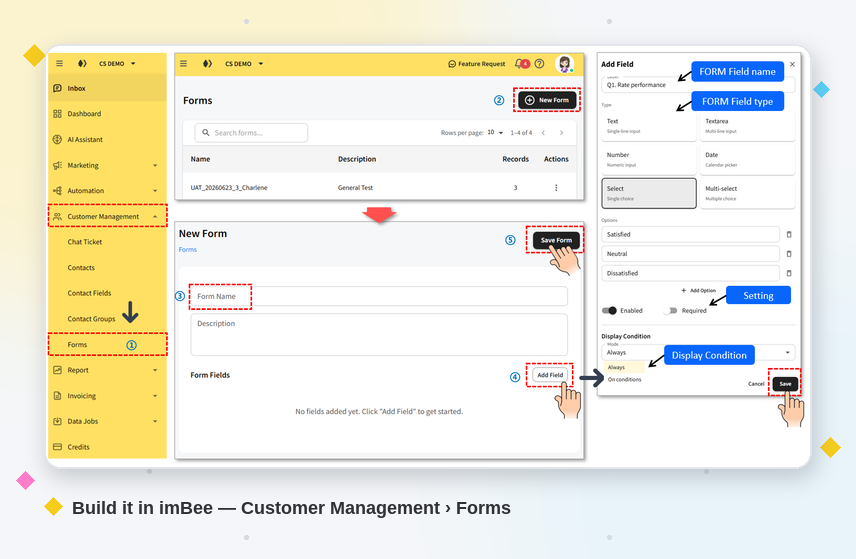
Add logic. A field can show Always, or only On conditions — for example, only reveal a "Department" field after someone selects "Specialist". Conditions branch on previous select, number and date answers, so the form stays short and relevant. Keep labels under about 20 characters; WhatsApp may truncate longer ones on small screens.
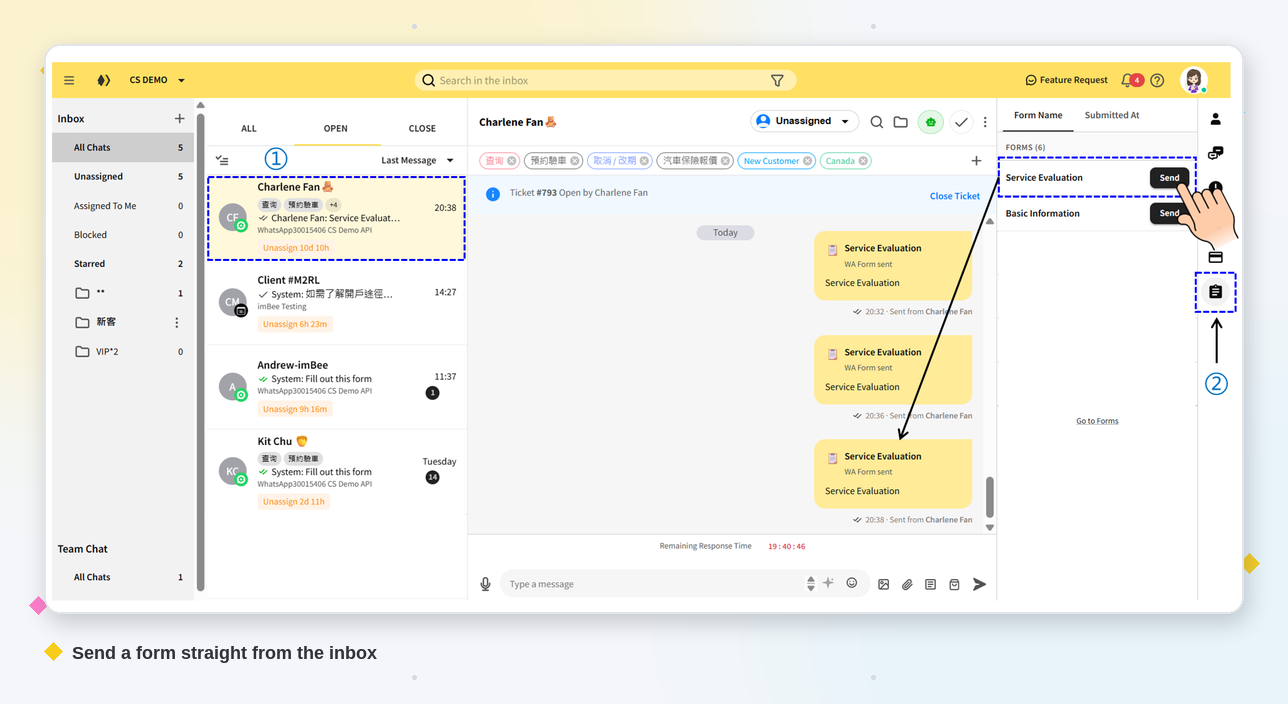
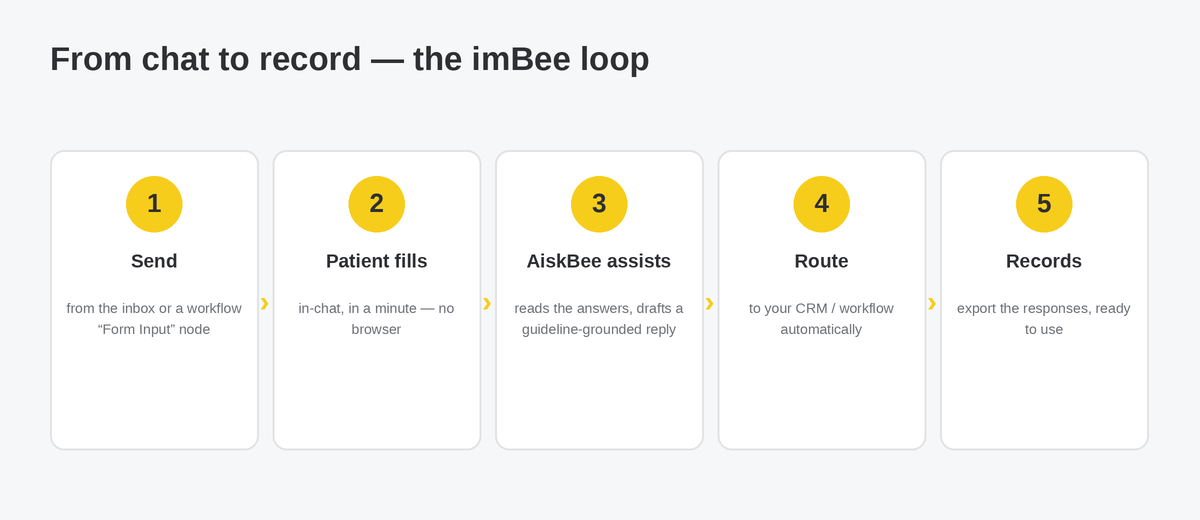
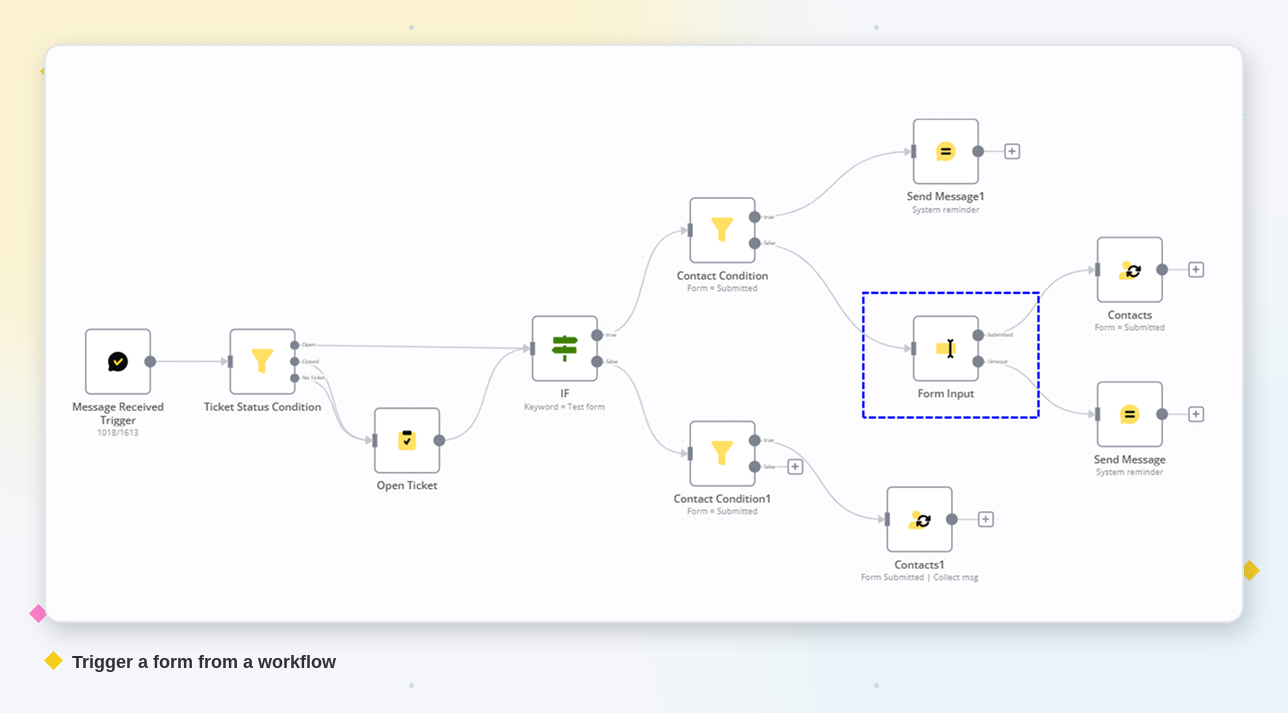
Send it. From the imBee inbox, tap the WhatsApp Form icon and pick a form; or add a "Form Input" node to a workflow so a form fires automatically at the right step. The customer fills it in inside the chat — no app to download, no website to load.
Capture it. Responses are encrypted in transit (Meta requires a 2048-bit RSA key pair for Flows) and return to imBee as structured records you can download or feed into your CRM and automations — protected under our ISO 27001-certified controls.
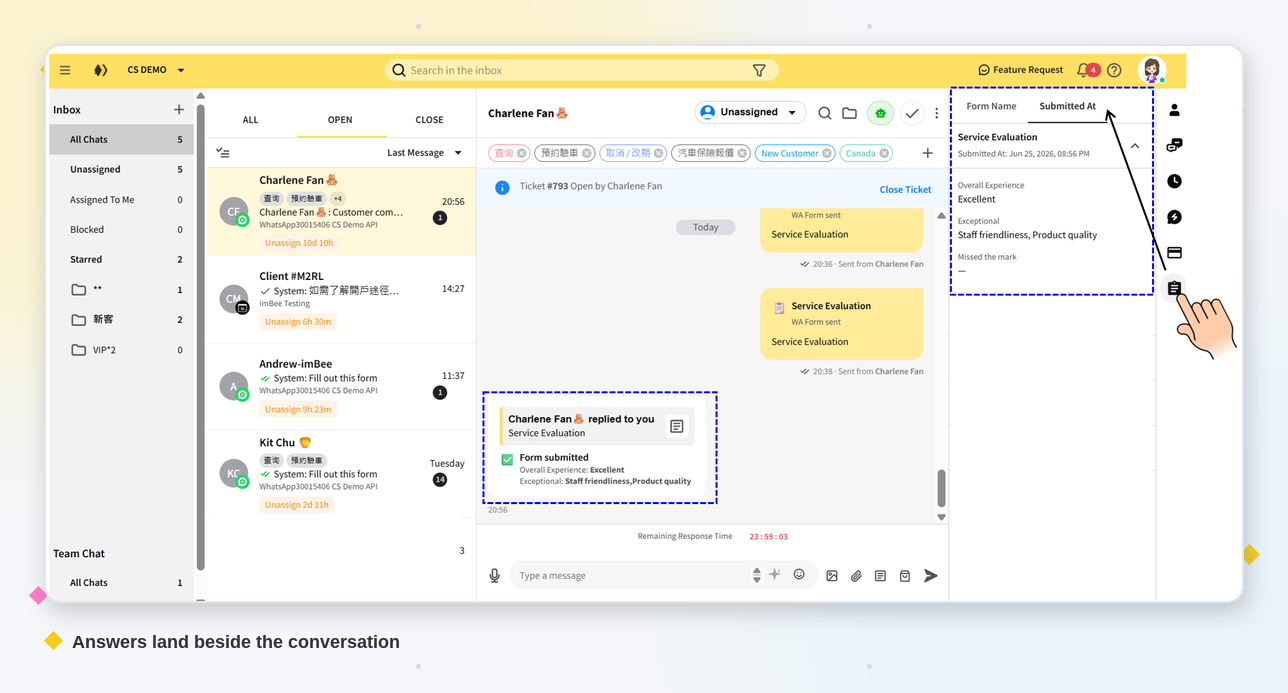
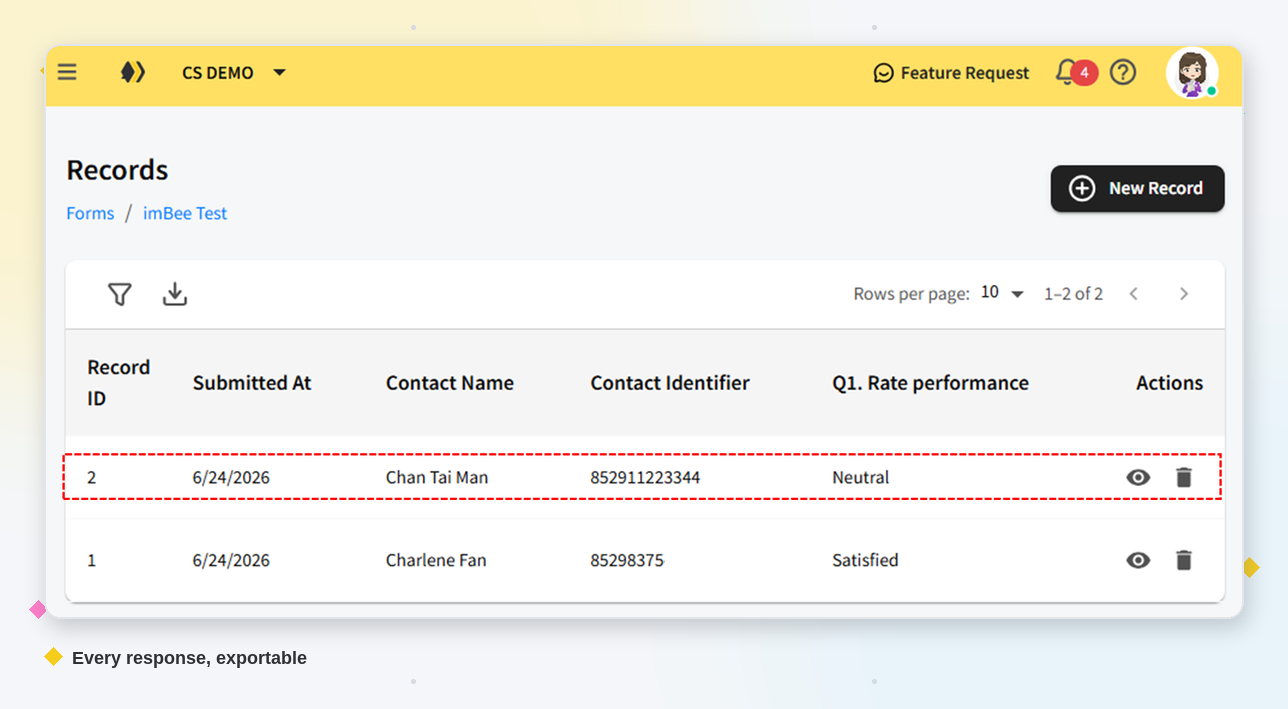
See it where you work. Every submission also appears beside the conversation: open a contact in the imBee inbox and the side panel lists the forms that contact has submitted, so an agent replies with the details already in front of them — no second system, and no asking the customer to repeat themselves. The full Records table stays one click away, with filters and a CSV export when you need the whole set.
A separate web form requires a browser transition. Zuko's 2025 All Forms table reports 51.71% overall conversion in its tracked dataset. That aggregate does not establish how much abandonment a redirect caused, or what an in-chat form will achieve for your audience.
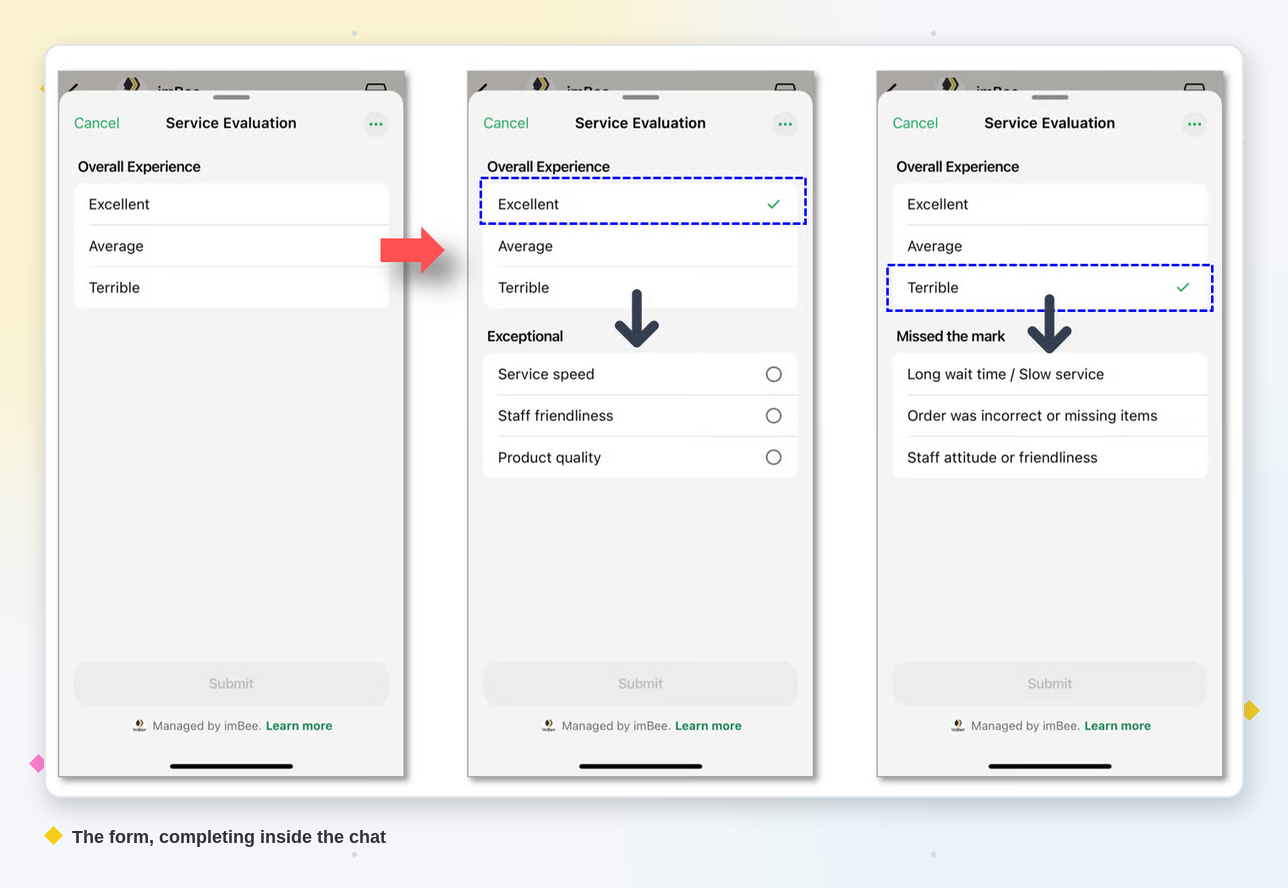
WhatsApp Form lets a customer complete a structured interaction inside WhatsApp. Test delivery, form starts, completed submissions and follow-up quality in your own workflow. A message read and a completed form are different events; compare them separately.
Compare like-for-like audiences, form complexity and traffic sources. A change in completion should be measured directly rather than inferred from another company's channel benchmark.
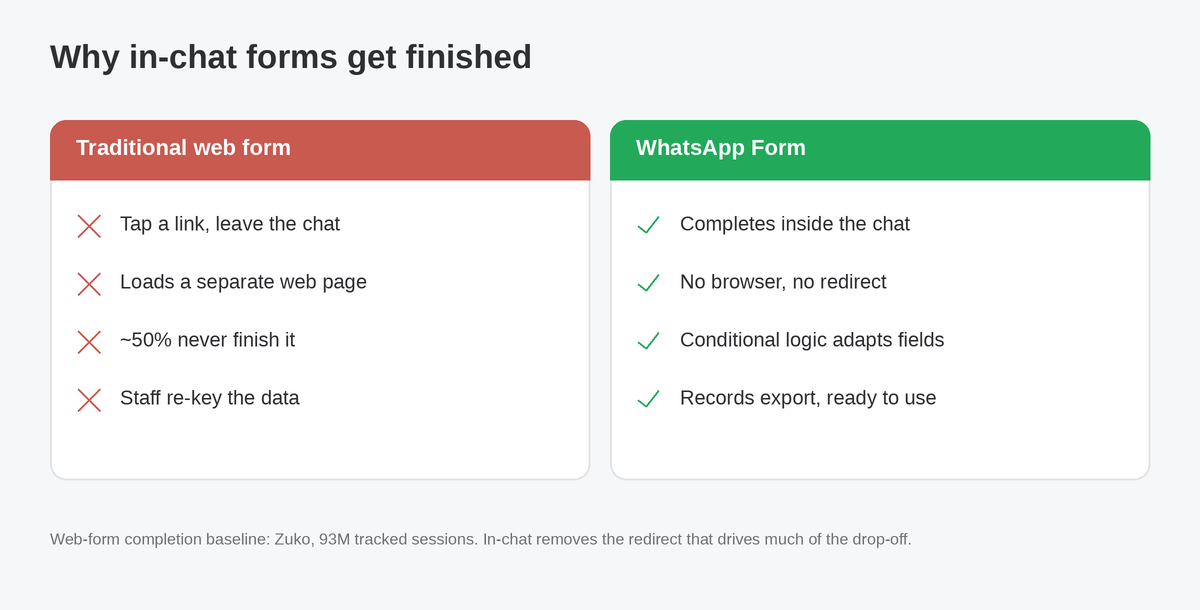
Nowhere is the drop-off more expensive than in healthcare, where a missed form often means a missed appointment. A hospital or clinic can use WhatsApp Form for the moments that usually clog the front desk:
Evaluate operational outcomes directly: completed bookings, manual entry time, reminder delivery and attendance. Published reminder studies evaluate particular interventions and populations; they do not prove that this form feature reduces no-shows by a fixed percentage.
Before collecting patient information, define the administrative purpose, minimum necessary fields, permissions and retention. Verify platform and local requirements, the current certificate scope and the configured controls. Certification alone does not approve a clinical workflow.
Beyond healthcare, WhatsApp Form fits any moment you need clean, structured data:
Whatever the use case, every response lands in the same unified inbox as your other channels — so the data is one click from action, not stranded in a spreadsheet.
Choose a collection method around your audience, form complexity and operating requirements. Measure completion rather than assuming one method always finishes.
| Approach | Where it happens | 最適合 | The catch |
|---|---|---|---|
| WhatsApp Form (Flows) | Inside the chat | Bookings, intake, surveys, lead capture | Needs the WhatsApp Business Platform |
| External web form | A separate browser tab | Very long or complex forms | Requires a separate browser transition; measure completion |
| Free-text chatbot | Inside the chat | Quick, open questions | Unstructured data to clean up later |
WhatsApp Form sits in the sweet spot: the structure of a form with the completion of a conversation. And in imBee it does not stand alone — every response lands in one unified inbox alongside WhatsApp, WeChat, Instagram and more, where imBee AI can read the answers and draft a guideline-grounded reply, and your workflows route and export the data. That combination of in-chat forms, configured AI assistance, multiple channels and reviewable controls is where imBee goes beyond a simple form-to-CRM tool — and you build and publish the form natively in imBee, without ever opening WhatsApp Manager.
| What matters | imBee WhatsApp Form | Verify in each vendor demonstration |
|---|---|---|
| Build & publish the form | Built and published natively inside imBee — no WhatsApp Manager, no code | Where are the form built and published, and which permissions and external steps are required? |
| All your channels | One unified inbox across WhatsApp, WeChat, Instagram, Messenger and SMS | Which channels are included, and where do agents see submitted answers? |
| AI on the answers | imBee AI reads each submission and drafts a reply that follows your guidelines | What AI assistance is available, and how are its answers, escalation and human review tested? |
| From data to action | Exportable records plus native workflow automation (Form Input node) | How are records exported, routed and integrated in the demonstrated plan? |
| 企業資安 | ISO 27001-certified handling | What certificate scope, permissions, retention and contractual controls cover the proposed configuration? |
What is WhatsApp Form?
WhatsApp Form is imBee's no-code form builder, built on Meta's WhatsApp Flows. It lets a business collect structured information — bookings, patient intake, surveys, lead qualification — inside the WhatsApp chat, with no browser redirect, then return the answers as exportable records.
Is WhatsApp Form built on WhatsApp Flows?
Yes. It is built on Meta's official WhatsApp Flows, the framework for structured, multi-screen interactions inside WhatsApp. imBee adds a no-code builder, inbox and workflow sending, conditional logic and exportable records on top.
Do customers have to leave WhatsApp to fill it in?
The form opens and submits inside the WhatsApp conversation. This removes a separate browser transition. Measure completion in your own audience instead of assuming a fixed improvement.
What field types can a WhatsApp Form include?
Text, text area, number, date, single-select and multi-select fields, each optionally required. Conditional logic can show or hide later fields based on previous select, number or date answers, so the form stays short and relevant.
Is WhatsApp Form secure enough for patient data?
Review the proposed data collection before using it for patient information. Confirm the minimum necessary fields, encryption, access controls, retention, current certificate scope and local requirements. A company certificate or an encrypted response alone does not approve a clinical workflow.
Can I use WhatsApp Form for appointment booking and patient intake?
Appointment requests and administrative pre-registration are possible uses, subject to an approved process and the configured platform features. Clinical screening or triage needs separate approval. Measure bookings and attendance directly; no fixed no-show reduction is promised.
How is WhatsApp Form different from a Google Form or web form?
A conventional web form opens on a separate page; a WhatsApp Form runs inside the conversation. Compare form complexity, accessibility, permissions and measured completion to choose the suitable approach.
Where do the answers go, and who can see them?
Every submission is saved as a form record. Agents see a contact's submitted forms in the inbox side panel, right next to the conversation, so they can pick up the thread without switching systems. Team leads can open the full Records table for a form, filter it by date, contact or any field value, and export the filtered set as CSV — or let a workflow push each answer straight into your CRM.
How do I get WhatsApp Form?
Look under Customer Management > Forms in imBee. Confirm availability, permissions, supported fields and the publishing workflow for your account. Test a form with your team before deployment, or book a demonstration around your proposed use case.

Kelly S.
Content Team Lead, imBee
Kelly S. owns content strategy, product positioning, and customer education at imBee. Previously, Kelly led B2B SaaS content programs and supported go-to-market initiatives for customer engagement products. On the imBee blog, Kelly covers conversational commerce, omnichannel messaging, WhatsApp Business, customer experience, and strategies for scaling business communications.
Questions about anything in this article? Talk to our team.